> For the complete documentation index, see [llms.txt](https://penida.gitbook.io/cowlendar-help/llms.txt). Markdown versions of documentation pages are available by appending `.md` to page URLs; this page is available as [Markdown](https://penida.gitbook.io/cowlendar-help/how-to.../how-to-configure-availability-in-cowlendar-services/how-to-set-weekdays-+-specific-weekend-date.md).
# How to set weekdays + specific weekend date
This configuration allows you to offer **regular weekday availability** while also adding **a specific weekend date** for a one-time event, workshop, or special session.
It’s perfect when your service usually runs Monday to Friday, but you occasionally want to open bookings on a **specific Saturday or Sunday** without affecting your regular schedule.
***
### **🧩 When to Use This Setup**
Use this configuration if you want to:
* Keep a **consistent weekday schedule**
* Add a **one-off weekend event**
* Avoid changing or disrupting your regular availability
* Offer workshops, classes, or special events on specific weekend dates
***
### **📲 Step-by-Step: Configure Weekdays + a Specific Weekend Date**
1. From your **Shopify admin**, go to **Apps**.
2. Open **Cowlendar**.
3. Click on **My Services**.
4. Find the service you want to edit and click **Edit**.
5. Go to the **Availability** tab.
6. Make sure **Availability mode** is set to **Availability per service**.
7. Just below **Availability mode**, locate the **Availability** section.
***
### **🗓️ Configure Your Regular Weekday Availability**
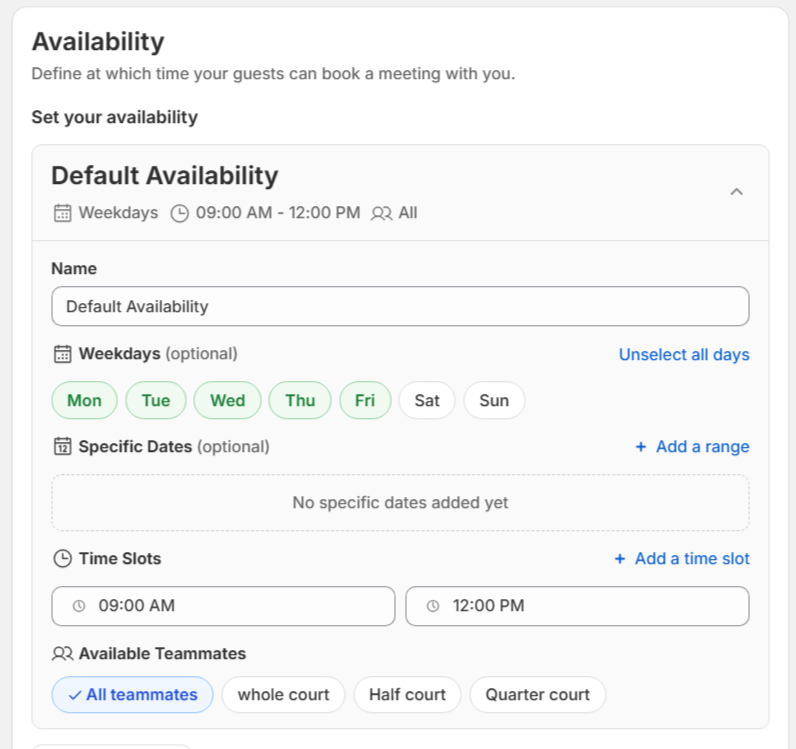
8. In your existing availability block:
* Use the **Weekdays** option
* Make sure **only Monday to Friday** are selected
* Leave Saturday and Sunday **unchecked**
This ensures your regular weekday availability stays active and unchanged.
***
### **🎉 Add a Specific Weekend Date**
9. Click **Add availability** to create a new availability block.
10. Set the **Title** to something like **Weekend** (internal use only).
11. In this new availability:
* **Deselect all weekdays**, including Saturday and Sunday
* Enable **Specific dates**
* Select the **exact weekend date** you want to offer (Saturday or Sunday)
12. Set the **time slot(s)** you want to offer for that specific date.
13. Click **Save** to apply the changes.
***
### **✅ Final Result**
* Your **regular Monday–Friday availability** remains active.
* The **specific weekend date** appears as bookable only on the selected date.
* The weekend availability does **not repeat** and does **not affect** your standard schedule.
Customers will see:
* Normal weekday availability as usual
* An additional available date on the weekend for your special event, class, or workshop
***
{% hint style="info" %}
💡 This setup is ideal for limited-edition events, special workshops, holiday sessions, or exclusive weekend classes without overcomplicating your service availability.
{% endhint %}
.png?alt=media&token=a0acf16f-e8f1-4b56-af0e-48bbd1feaca9)