> For the complete documentation index, see [llms.txt](https://penida.gitbook.io/cowlendar-help/llms.txt). Markdown versions of documentation pages are available by appending `.md` to page URLs; this page is available as [Markdown](https://penida.gitbook.io/cowlendar-help/how-to.../how-to-manage-notifications-in-cowlendar/how-to-manage-emails-notifications-in-services.md).
# How to Manage Emails Notifications in services
Email Notifications are the default communication channel in Cowlendar and are available starting from the **Free plan**.
By default, all customers automatically receive email notifications for every booking event, including confirmations, reminders, reschedules, and cancellations. No additional setup is required to start using email.
Because email remains the most reliable contact method for most customers, we strongly recommend keeping email notifications enabled for all services.
***
### What Are Email Notifications in Cowlendar?
Cowlendar Email Notifications automatically send emails to your customers when:
* A booking is confirmed
* A booking is rescheduled
* A booking is canceled
* A reminder is sent before the appointment
These emails help keep customers informed, reduce no-shows, and provide a clear booking history.
Common use cases include:
* Booking confirmation emails
* Shopify booking reminders by email
* Appointment update notifications
* Cancellation confirmations
***
### How to Configure Email Notifications per Service
Although email notifications are enabled by default, you can still control exactly **when** emails are sent for each service.
#### Step-by-Step: Configure Email Notifications
1. From your Shopify admin, go to **Apps**.
2. Open **Cowlendar**.
3. Navigate to **My Services**.
4. Find the service you want to configure and click **Edit**.
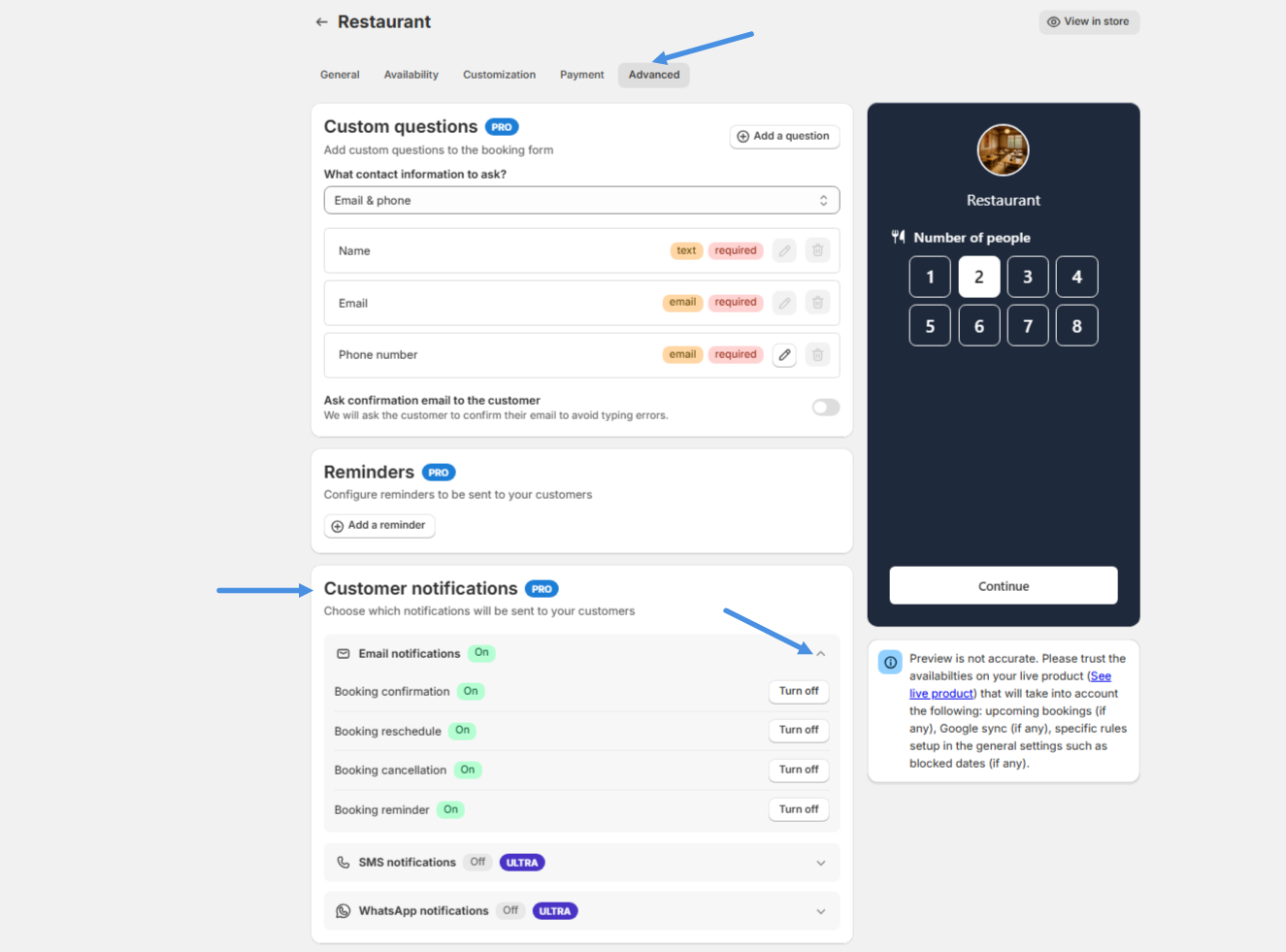
5. Go to the **Advanced** tab.
6. Scroll down to the **Notifications** section.
7. Enable or disable Email notifications for:
* Booking confirmation
* Reschedule
* Cancellation
* Reminder
This works the same way as SMS and WhatsApp, allowing you to fully control notification timing per service.
***
### Custom Email Message per Service
Cowlendar also allows you to add a **custom message inside the email** for each individual service.
This is useful if you want to:
* Add preparation instructions
* Share meeting links or directions
* Include cancellation policies
* Provide service-specific details
Each service can have its own custom email content.
{% content-ref url="/pages/cjSD8USpq2wnPbbJA25W" %}
[How to Customize Confirmation Emails for Each Service in Cowlendar](/cowlendar-help/how-to.../how-to-customize-confirmation-emails-for-each-service-in-cowlendar.md)
{% endcontent-ref %}
***
### Best Practices for Email Booking Notifications
For the best results:
* Always keep email notifications enabled.
* Combine email with WhatsApp or SMS for critical services.
* Use reminders to reduce no-shows.
* Add service-specific instructions inside emails.
* Treat email as your primary communication channel.
Even if you use WhatsApp or SMS, email provides a permanent written record of the booking for your customers.
***
### Final Thoughts
Email Notifications are the foundation of communication in Cowlendar.
With Cowlendar email notifications, you can:
* Automatically send booking confirmations
* Deliver Shopify booking reminders by email
* Notify customers of changes
* Maintain clear communication without extra cost
Since email is included from the Free plan and works automatically, we highly recommend keeping it active for every service.
.png?alt=media&token=a0acf16f-e8f1-4b56-af0e-48bbd1feaca9)