> For the complete documentation index, see [llms.txt](https://penida.gitbook.io/cowlendar-help/llms.txt). Markdown versions of documentation pages are available by appending `.md` to page URLs; this page is available as [Markdown](https://penida.gitbook.io/cowlendar-help/how-to.../how-to-set-up-recurring-service-subscription-in-cowlendar.md).
# How to Set Up Recurring Service Subscription in Cowlendar
{% hint style="warning" %}
Subscriptions are available **on the Ultra plan** and **only for Regular booking services**.
{% endhint %}
Subscriptions are one of the most requested and powerful features in Cowlendar.
They allow you to offer **recurring bookings with recurring payments**, directly tied to your services, so customers can commit long‑term while you generate predictable revenue.
With Subscriptions, you can:
* Sell time‑based services on a recurring basis
* Automatically bill customers at fixed intervals
* Give customers booking credits they can use flexibly
* Create multiple subscription plans inside the same service
***
### Key Strengths of the Subscription Feature
* **Recurring revenue** with automated billing via Shopify
* **Multiple subscription plans per service** (customers choose the one they want)
* **Fully customizable rules** (commitment, credits, booking limits)
* **Customer self‑management** (pause / cancel, if enabled)
* **Flexible booking model** using credits instead of fixed dates
* **Perfect for routines, programs, and long‑term engagements**
Each subscription is independent, clearly displayed, and easy for customers to understand when booking.
***
### What You Can Build With Subscriptions
Subscriptions allow you to sell **recurring access to time slots**.
Instead of selling a single appointment, you sell:
* A **billing cycle** (weekly, monthly, yearly, etc.)
* A **set number of booking credits per cycle**
* A **commitment structure**, if needed
> **Important concept**:\
> **1 credit = 1 booking**
***
### How to Enable Subscriptions
1. From your **Shopify admin**, go to **Apps**
2. Open **Cowlendar**
3. Go to **My Services**
4. Click **Edit** on your service
5. Make sure the service type is **Regular booking**
6. Go to the **General** tab
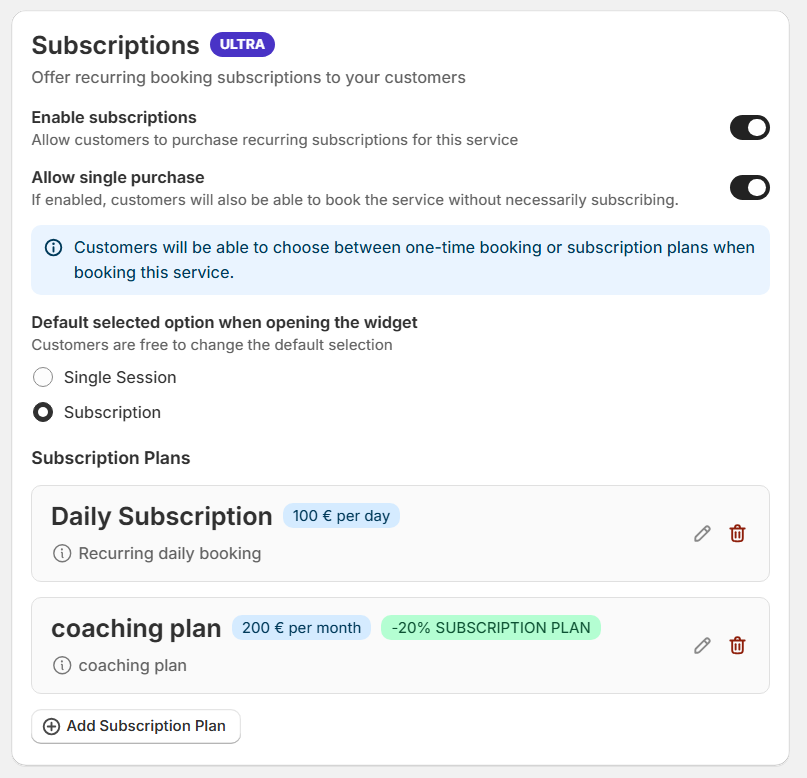
7. Scroll to the bottom and find the **Subscriptions** section
1. Enable **Subscriptions**
2. Create and customize your subscription plans
***
### Subscription Configuration – Step by Step
Each service can contain **multiple subscription plans**. Customers will see them and select the one that best fits their needs.
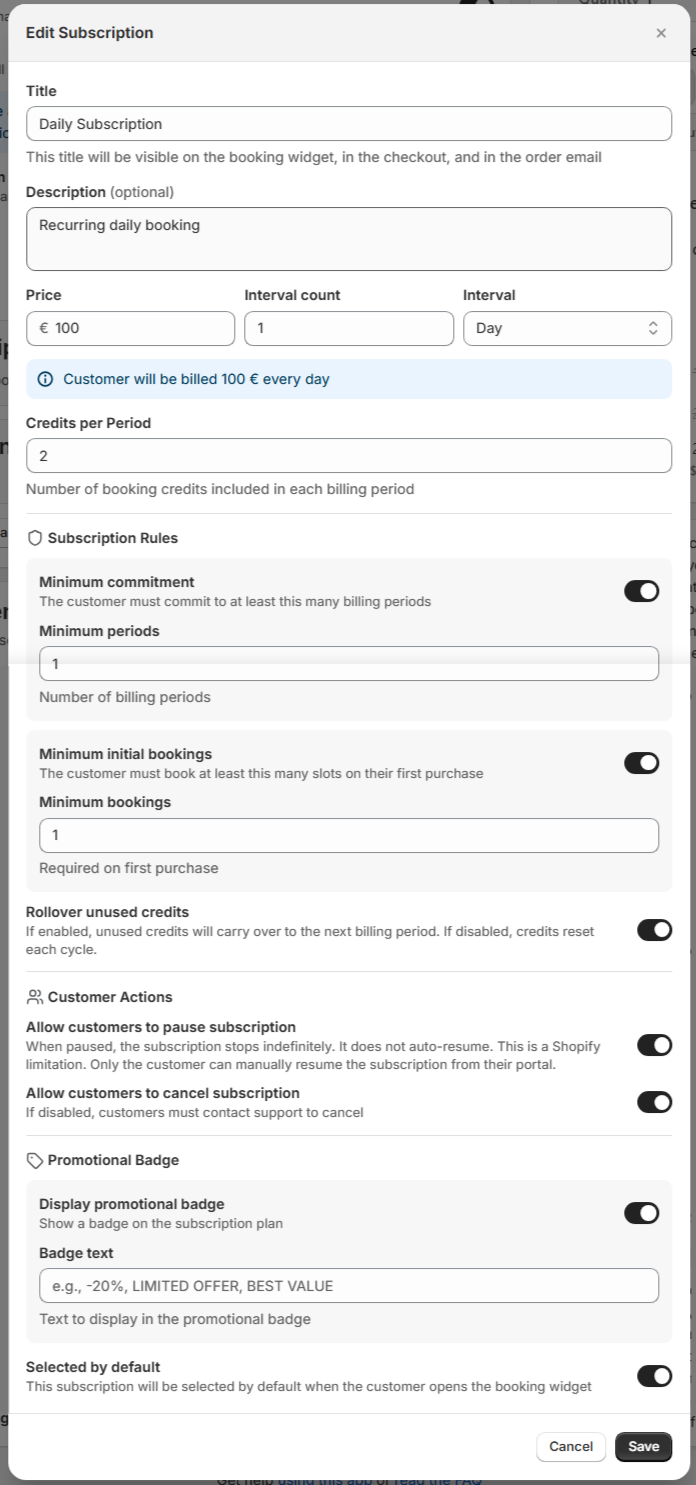
#### 1. Title and Description
Each subscription has:
* **Title**: Visible to customers (e.g. *Monthly Yoga Pass*)
* **Description**: Explain what’s included, rules, or benefits
This helps customers clearly compare plans.
***
#### 2. Price
This is the **recurring amount charged to the customer**.
Example:
* Price: **$100**
This price will be charged repeatedly based on the interval configuration.
***
#### 3. Billing Interval
**Interval Count**
Defines **how often the charge occurs**.
**Interval**
Choose the billing unit:
* Day
* Week
* Month
* Year
**Example**:
* Price: $100
* Interval count: 1
* Interval: Month
➡️ The customer will be billed **$100 every month**.
***
#### 4. Credits Per Period
This defines how many bookings the customer can make **per billing cycle**.
* 1 credit = 1 booking
* Credits refresh every billing period
Examples:
* 4 credits per month → up to 4 bookings per month
* 20 credits per month → ideal for daily or frequent services
***
### 5. Subscription Rules (Optional)
These rules can be enabled or disabled independently for each subscription.
#### Minimum Commitment
The customer must stay subscribed for a minimum number of billing periods.
Examples:
* 3 months minimum
* 6 billing cycles
Useful to:
* Reduce churn
* Secure long‑term clients
* Support structured programs
#### Minimum Initial Bookings
Defines how many bookings the customer must schedule **when purchasing the subscription**.
Examples:
* Require at least 2 bookings on first purchase
* Force initial planning and commitment
***
### 6. Customer Actions (Optional)
#### Allow Customers to Pause Subscription
When enabled:
* Customers can pause their subscription indefinitely
* Billing stops while paused
* **Subscriptions do not auto‑resume** (Shopify limitation)
* Only the customer can resume from their Shopify customer portal
Useful for:
* Vacations
* Temporary schedule changes
#### Allow Customers to Cancel Subscription
* If enabled: customers can cancel anytime (respecting minimum commitment)
* If disabled: customers must contact support to cancel
***
### 7. Promotional Options
#### Promotional Badge
* Display a badge on the subscription plan
* Useful for highlighting best value or recommended plans
#### Selected by Default
* Automatically pre‑selects this subscription in the booking widget
* Ideal for guiding customers toward your preferred option
***
#### Managing the Subscription as a Customer
{% content-ref url="/pages/PHsqVV5scOPnM8Gc5bTi" %}
[How Your Customers Manage & Renew Subscriptions](/cowlendar-help/how-to.../how-to-set-up-recurring-service-subscription-in-cowlendar/how-your-customers-manage-and-renew-subscriptions.md)
{% endcontent-ref %}
***
#### Managing the Subscription as an Admin
{% content-ref url="/pages/th4e6mW7DwIcdNffsfc8" %}
[How Admins Manage Subscriptions in Cowlendar](/cowlendar-help/how-to.../how-to-set-up-recurring-service-subscription-in-cowlendar/how-admins-manage-subscriptions-in-cowlendar.md)
{% endcontent-ref %}
***
### Use Cases by Industry:
{% content-ref url="/pages/sb30smguIkkoyvsXnWCi" %}
[Use Case: Wellness & Fitness - Selling Class Passes and Monthly Memberships](/cowlendar-help/how-to.../how-to-set-up-recurring-service-subscription-in-cowlendar/use-case-wellness-and-fitness-selling-class-passes-and-monthly-memberships.md)
{% endcontent-ref %}
***
{% content-ref url="/pages/sncZP03iVbbQDM14q54Y" %}
[Use Case: Education & Coaching - Setting Up Recurring Tutoring Sessions](/cowlendar-help/how-to.../how-to-set-up-recurring-service-subscription-in-cowlendar/use-case-education-and-coaching-setting-up-recurring-tutoring-sessions.md)
{% endcontent-ref %}
***
{% content-ref url="/pages/pcllejTEA7gs4JSsH67O" %}
[Use Case: Automating Monthly Home or Professional Maintenance Services](/cowlendar-help/how-to.../how-to-set-up-recurring-service-subscription-in-cowlendar/use-case-automating-monthly-home-or-professional-maintenance-services.md)
{% endcontent-ref %}
***
### Final Notes
Subscriptions transform Cowlendar from a simple booking tool into a **long‑term business engine**.
They are best used when:
* Services are recurring
* Clients benefit from routines
* Predictable revenue matters
If you offer time‑based services and want stability, Subscriptions are one of the most powerful tools available in Cowlendar.
{% hint style="info" %}
**Reminder**: Subscriptions are available on the **Ultra plan** and **only for Regular booking services**.
{% endhint %}
.png?alt=media&token=a0acf16f-e8f1-4b56-af0e-48bbd1feaca9)